









Securing Remote Work Environments with AWS S3
Technical aspects of securing remote work environments using AWS S3, detailing essential tools, technologies, and best practices
This is a Press Release edited by StorageNewsletter.com on July 11, 2024 at 7:59 pm
By Sameer Danave, senior director, marketing, MSys Technologies LLC
The shift to remote work has accelerated rapidly in recent years, driven by global events and technological advancements. Ensuring that remote work environments remain secure is paramount, and Amazon Web Services (AWS) Simple Storage Service (S3) offers a robust solution for securely storing and managing data in the cloud.
In this article, I will guide you through the technical aspects of securing remote work environments using AWS S3, detailing the essential tools, technologies, and best practices.
Understanding AWS S3
Amazon Simple Storage Service is a scalable object storage solution designed to store and retrieve data from anywhere. It provides high durability, availability, and security for your data with features like versioning, encryption, and access control. It is extensively utilized for data backup and restoration, archiving, and big data analytics, ensuring robust and efficient data management across various applications.
Click to enlarge
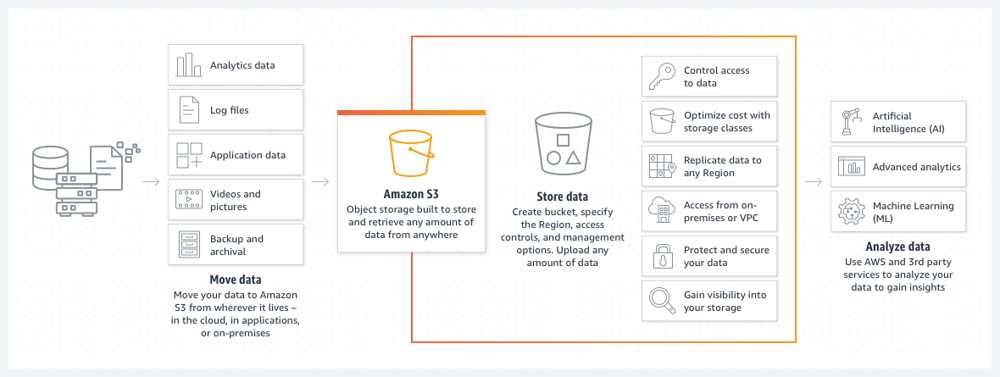
(Source: AWS)
Steps to Secure Remote Work Environments with AWS S3
AWS S3 offers robust solutions to protect sensitive data. Organizations can leverage advanced security features by following key steps to ensure their remote work operations remain safe and compliant.
1. Setting Up AWS IAM for Access Control
Setting up AWS IAM is the first step in securing your remote work environment. This service allows you to monitor and manage access to AWS services and resources securely.
- Create IAM Users and Groups: Create individual IAM users for each employee and group them based on their roles and responsibilities. This helps in managing permissions effectively.
- Define IAM Policies: Use IAM policies to define permissions for users and groups. Ensure that the principle of least privilege is followed, granting users only the permissions they need to perform their tasks.
2. Implementing Encryption
Encryption is essential for protecting sensitive data stored in S3 buckets.
AWS S3 provides multiple encryption options:
- Server-Side Encryption (SSE): AWS manages the encryption and decryption process. You can choose from SSE-S3 (managed by AWS), SSE-KMS (managed by AWS Key Management Service), or SSE-C (customer-provided keys).
- Client-Side Encryption (CSE): You manage the encryption process before uploading data to S3. This is useful when you need to retain control over encryption keys.
3. Configuring Access Control Policies
Robust access control ensures that authorized users and applications can access S3 data.
Utilize the following methods:
- Bucket Policies: Define policies directly on S3 buckets to control access. For example, restrict access to specific IP addresses or VPC endpoints.
- Access Control Lists (ACLs): Use ACLs to grant basic read/write permissions to AWS accounts or predefined groups.
4. Enabling Logging and Monitoring
Monitoring and logging are necessary for identifying and responding to security incidents. AWS provides several tools for this purpose:
- AWS CloudTrail: Enable CloudTrail to log all API calls to your S3 buckets. This helps track user activities and detect unauthorized access.
- Amazon S3 Access Logs: Configure S3 access logging to record details about requests made to your S3 buckets.
- Amazon CloudWatch: CloudWatch is used to monitor S3 metrics and set up alarms for specific events, such as unauthorized access attempts.
5. Implementing Data Protection Strategies
To ensure data availability and durability, implement data protection strategies:
- Versioning: Enable versioning to keep multiple versions of an object in the same bucket. This helps restore previous versions in case of accidental deletion or overwriting.
- Replication: Use cross-region replication (CRR) or same-region replication (SRR) to automatically replicate objects across different AWS regions or within the same area.
- Lifecycle Policies: Define lifecycle policies to automate the transition of objects between different storage classes and delete outdated objects.
Best Practices for Securing Remote Work Environments
- Use Multi-Factor Authentication (MFA): Implement MFA for all users to create an additional security layer.
- Enable Object Lock: Utilize S3 Object Lock to safeguard objects from deletion or modification for a designated period, thereby enhancing data immutability.
- Implement Strong Password Policies: Ensure all IAM users adhere to strong password policies, including complexity requirements and regular rotations.
- Monitor Network Traffic: Use AWS VPC Flow Logs to monitor network traffic for your S3 buckets, aiding in the detection and analysis of suspicious activities.
- Utilize AWS Config: Use AWS Config to track configuration changes and ensure that your S3 buckets conform to best security practices and compliance requirements.
Advanced Security Measures
- Integrate AWS Macie: AWS Macie leverages machine learning to automatically discover, identify, classify, and protect sensitive data stored in S3. It identifies data like personal information and intellectual property and provides dashboards and alerts to monitor data security.
- Leverage AWS KMS: Use AWS Key Management Service (KMS) to create and manage cryptographic keys controlling encrypted data access. KMS integrates seamlessly with S3 for managing server-side encryption keys.
- Implement GuardDuty: This is a threat detection service that monitors for malicious activity and unauthorized behavior. It provides detailed security findings and integrates with S3 to monitor data access patterns.
- Adopt AWS Organizations: AWS Organizations helps manage multiple AWS accounts centrally. Use Service Control Policies (SCPs) to enforce security policies across all accounts, ensuring consistent security practices.
Incident Response and Recovery
- Prepare an Incident Response Plan: A well-defined incident response plan includes procedures for detecting, responding to, and recovering from security incidents. Regularly test and update the plan.
- Enable Cross-Account Access: Set up cross-account access to allow trusted accounts to access your S3 buckets. This is useful for centralized logging and monitoring purposes.
- Utilize AWS Security Hub: AWS Security Hub provides a complete view of your security state within AWS. It aggregates, organizes, and prioritizes security findings from multiple AWS services, including S3.
Wrapping Up
Securing remote work environments with AWS S3 involves a comprehensive approach with robust access control, encryption, logging, monitoring, and data protection strategies. By utilizing AWS’s robust tools and adhering to best practices, organizations can maintain secure and resilient remote work environments vs. threats.








 Subscribe to our free daily newsletter