









How Long Do HDDs Last?
Average drive spun for 2 years and 10 months, analysis found based on 2,007 units tested.
This is a Press Release edited by StorageNewsletter.com on May 5, 2023 at 2:02 pm This blog was posted by Secure Data Recovery, written by Timothy Burlee, content writer for Secure Data Recovery Services.
What if replacing a HDD was more scientific and less speculative? Given the lack of accessible data for HDD failures, the public often relies on abstract advice or conjecture to guide their actions. This absence of evidence can lead to sudden or permanent data loss for unsuspecting individuals and organizations. At Secure Data Recovery, we believe people deserve more credible, substantive information.
Uncovering the truth about HDD durability
Secure Data Recovery is the authority in RAID, SSD, and HDD recovery. Since 2007, its technicians have encountered all failure scenarios across storage devices and resolved over 100,000 cases. In that time, it has acquired more certifications than other data recovery services, discovered advanced techniques, and invested in facilities and tools.
It has delivered results in the most challenging circumstances.
That experience and expertise allowed us to collect valuable data on failed HDDs, revealing unique insights into their failure rates and lifespans.
The findings might surprise most.
Evaluating HDD failure
Insiders usually measure life expectancy by a device’s MTBF.
However, the MTBF can be based on several assumptions and definitions that do not match real-world conditions.
In 2022, we gathered operational information from thousands of damaged or defective devices to better understand when HDDs fail.
The first variable that our engineers verified was power-on hours. We defined power-on hours as the total time the HDD was functional, calculated from when the user first started the device to its arrival at our facilities.
In addition, we computed the current pending sector count for failed devices. The current pending sector count refers to the number of damaged or unusable sectors the HDD developed during routine read-and-write operations.
These metrics offer some understanding of the average lifespan of a HDD. Still, we wanted to accumulate the most relevant data possible.
As a result, we diagnosed each HDD and excluded devices that suffered non-predictable failures from the sample.
For this research, we classified non-predictable failures as damage from unexpected events, including electrical surges, malware, natural disasters, or accidental mishandling.
The subset of data we studied involved predictable failures, such as an accumulation of reallocation errors. Recording the number of errors and operational hours for predictable failures gives users more information to anticipate and prepare for the inevitable.
Data behind HDD performance
The final sample consisted of 2,007 HDDs from 6 major manufacturers.
Models ranged from 40GB to 10TB.
Values for power-on hours and current pending sector count depict the average.
The data is presented below.
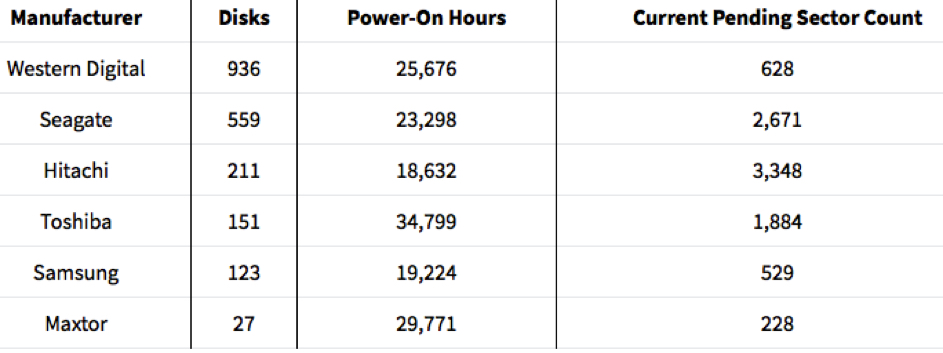
Power-on hours indicate that the average HDD in the sample spun for 25,233 hours before failing. That represents 1,051 days or two years and ten months.
During that span, the sample’s average device developed 1,548 bad sectors.
To put that number into perspective: 1TB HDDs can have just under 2 billion total sectors.
While 1,548 bad sectors out of hundreds of millions or even billions of disk subdivisions might seem minuscule, the rate of development often increases, and the risk of data corruption multiplies.
The following figures examine manufacturers across these categories.
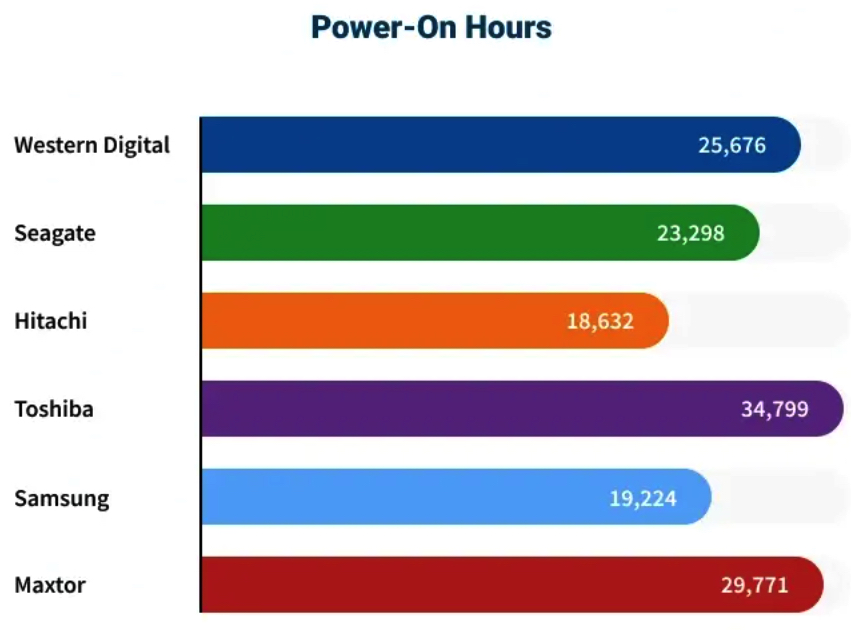
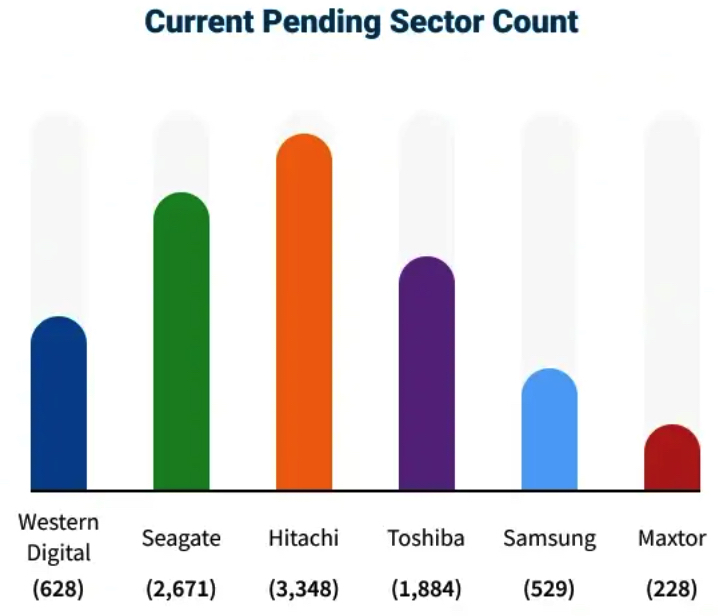
The above statistics illustrate discrepancies between prominent manufacturers.
Some HDDs appear more durable and function for greater lengths of time. Others seem more resilient and better withstand mechanical damage.
But we recognized the need for a closer examination.
Therefore, we focused on the data from Western Digital and Seagate drives.
Both of them shipped almost 80% of all HDDs in 2021, making them the biggest manufacturers in the world. And our sample reflects that fact. The 2 manufacturers models accounted for around 75% of the HDDs we studied.
We collected data on their most popular products.
Similar to the broader, manufacturer-level data, there is variance within the model data.
Select HDDs in the sample recorded more power-on hours while different devices developed fewer bad sectors than other disks.
To further process the data, we sorted each model according to its release date, then assessed its power-on hours and current pending sector count.
We found that the 5 most durable and resilient HDDs from each manufacturer were made before 2015. On the other hand, most of the least durable and resilient HDDs from each manufacturer were made after 2015.
Do older HDDs have longer lifespans?
Our data supports the premise that older HDDs are more durable and resilient than newer ones.
That might surprise people.
But there is a reasonable explanation.
A data-driven world demands improved storage performance.
The relentless pursuit of performance results in difficult design decisions and tradeoffs. Manufacturers incorporate cutting-edge technologies into their products to increase storage capacities and access speeds. And several innovations have contributed to the exponential growth of these metrics over the past decade.
At the onset of product development, drive manufacturers are forced to establish a list of requirements. One of the most stringent requirements of modern HDDs is size. Manufacturers limit the width of the device’s platters to 3.5 inches or 2.5 inches to fit inside the computer or laptop.
That size constraint means manufacturers must fit more components in the same physical space to achieve more storage space. The ultra-compact arrangement of read-and-write heads and platters within the case reduces allowance between moving parts, appearing to affect mechanical damage and wear resistance.
To boost storage capacities, manufacturers have updated recording technologies.
In 2005, manufacturers released HDDs with CMR to the public. CMR had much higher densities than traditional recording methods, enabling the commercial launch of a 1TB HDD in 2007.
Yet manufacturers continued to push boundaries.
Seagate shipped the first devices featuring SMR in 2013. SMR compresses the platter’s tracks so each concentric band overlaps like shingles on a roof, creating more usable space. Using SMR, manufacturers have produced models that exceed 20TB.
However, prioritizing larger storage capacities places components under more stress.
For example, the platter surface of a HDD with SMR is more complex, given its overlapping tracks. This intricate design leaves the platters more vulnerable to degradation.
In addition to the platter surface, data management of devices with SMR must be considered. Shingled HDDs are either device-managed, host-managed, or host-aware. Improper protocols could impact its performance. Frequent read-and-write operations could lead to logical errors. Excessive, improper use could cause the actuator arm and heads to become worn.
Thus, disks with CMR appear more durable and resilient than those with SMR.
And, in general, old drives seem more durable and resilient than new drives.
Note on SSD lifespans
SSDs are another common storage option.
Much has been written about SSD endurance and repairs.
To summarize, SSDs have a finite number of program/erase cycles before wearing out. And, like HDDs, SSDs experience errors at an increasing rate.
These factors complicate defining SSD failure and prevent a similar analysis.
In the end, ignoring non-predictable failures, the most significant variable for SSD lifespan is the amount of data written to the device.
Some users could exhaust their SSDs within a few years with intensive use. Other SSDs could last for more than 5 years.
Preparing for HDD replacement and failure
While this sample suggests that older models have some advantages over newer HDDs, reviewing all aspects of performance is crucial when sourcing storage devices.
For instance, newer HDDs provide unmatched capacities at competitive costs, making them viable options in numerous roles.
Users can still get years of use out of new products, and most drive manufacturers offer 2-year warranties on consumer models.
Picking the perfect HDD is a personal decision.
Determine the device’s use and select the one that best fulfills those tasks.
But developing a comprehensive plan and maintaining regular backups is essential regardless of manufacturer or model.
Our experts recommend following the 3-2-1 rule: Keep 3 copies of important data on 2 devices, with 1 of those copies saved offsite.
To implement: save the stored data on a Mac or PC’s internal HDD to an external HDD, then choose a reputable backup service or cloud storage option, such as Backblaze or Google Drive.
Obtaining a greater degree of data protection is easier than ever with online backups.
With over 15 years of experience, Secure Data Recovery has seen everything when it comes to storage devices. In that time, its technicians have retrieved billions of irreplaceable files and received frequent reminders of an astonishing fact:
Two-thirds of people report that a digital device is the first possession they would save.
Despite that, almost half of our recent survey’s respondents admitted they did not have backups.
Even with more information on HDD performance, users cannot predict each HDD failure.
And, without reliable backups, data loss is inevitable.








 Subscribe to our free daily newsletter