








Thecus NAS Controlled via Mobile Device
With Valence for Android and HippoRemote for iOS
This is a Press Release edited by StorageNewsletter.com on October 10, 2012 at 2:18 pmTwo module applications transform your mobile device into a remote control. Ever thought of setting Thecus Technology Corp.‘s NAS VLC player as dedicated multimedia source? Often users utilize their NAS to play movies or to enjoy music.
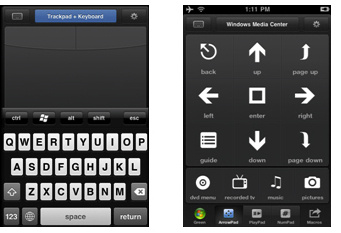
Valence
Originally, a mouse and keyboard is required to navigate through media
files that are in the NAS. However, with remote control applications for
both iOS and Android platforms, you navigate via your smartphone or
tablet.
HippoRemote
For Apple users, HippoRemote
is the app to look for and download. Some key characteristics include:
international character support, split-screen keyboard & thumb
scrolling, and support for Windows, Mac, and Linux.
Valence
For Android users, Valence
can be found and downloaded via Google’s Play Store for free. This app
transforms your Android device to work like a wireless mouse and
keyboard. In fact, no server app is needed in order to operate which
makes things much easier. Valence offers the comfort of browsing and
going through multimedia files. Valence app is compatible with Mac,
Linux and Ubuntu.
Mobile devices has become a necessity, it’s safe to say that majority of
people carry at least one with them wherever they go. Furthermore, NAS
devices are small and compact yet provide a hulk size amount of storage,
perfect for HD multimedia. Thus, controlling your media player remotely
such as VLC, makes your experience better. With controlling via wifi
and not infrared, users can now control anywhere around the house or
office. No more restrictions due to infrared signals. With a finger
touch on your mobile device, you are able to change volume, media
content and much more.







 Subscribe to our free daily newsletter